
logo
Our App
Membership
Workouts
Log inSign up
Our App
Membership
Workouts
WordPress blog image - secondary_users_Hero.png
All

How to Add Secondary Users to Your iFIT Account

If you have an iFIT Family membership, you can add up to 4 secondary users to your account! All you need is their email address to get started. Once you add them, your friends or family members will have access to the full iFIT Library on their iFIT-enabled machine or using the iFIT app. Ready to get started?
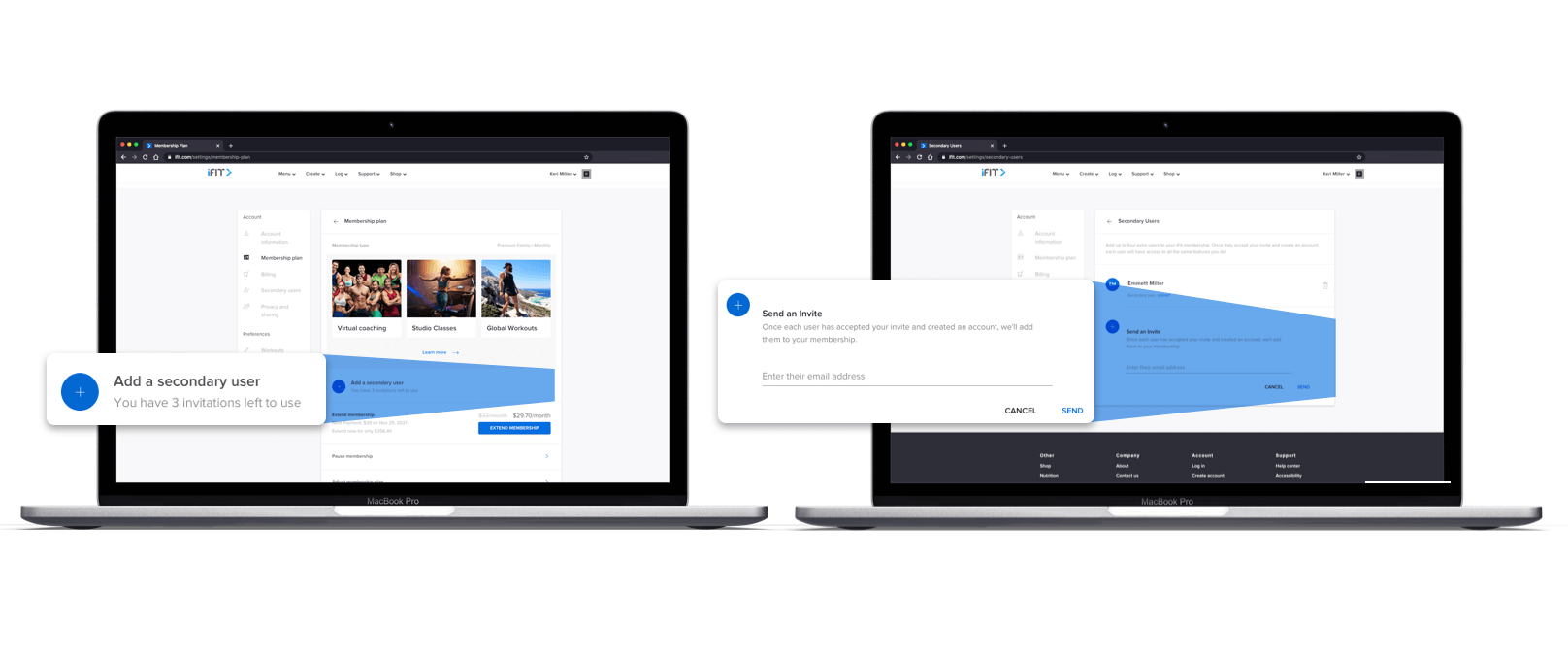
How to add users

  • Go to iFIT.com/login.
  • Enter the email address and password for your account.
  • Hover your mouse over your name in the top, right-hand corner of the screen.
  • In the drop-down menu, click on “Settings.”
  • In the left column, click on “Membership plan.”
  • Click the blue plus sign to add secondary users.
  • On the next screen, click the blue plus sign to send and invite users.
  • Simply enter the user’s email address, then click “Send.”
  • An invitation will be emailed to your selected friends or family members, so they can create their own iFIT account for free!

What they’ll get

Secondary users on your account will have full access to the entire iFIT Library. They can use all the same features you love, including Live Races, Global Workouts, Studio Classes, and more. Best of all, your secondary users have completely FREE access to iFIT when you add them to your account. 
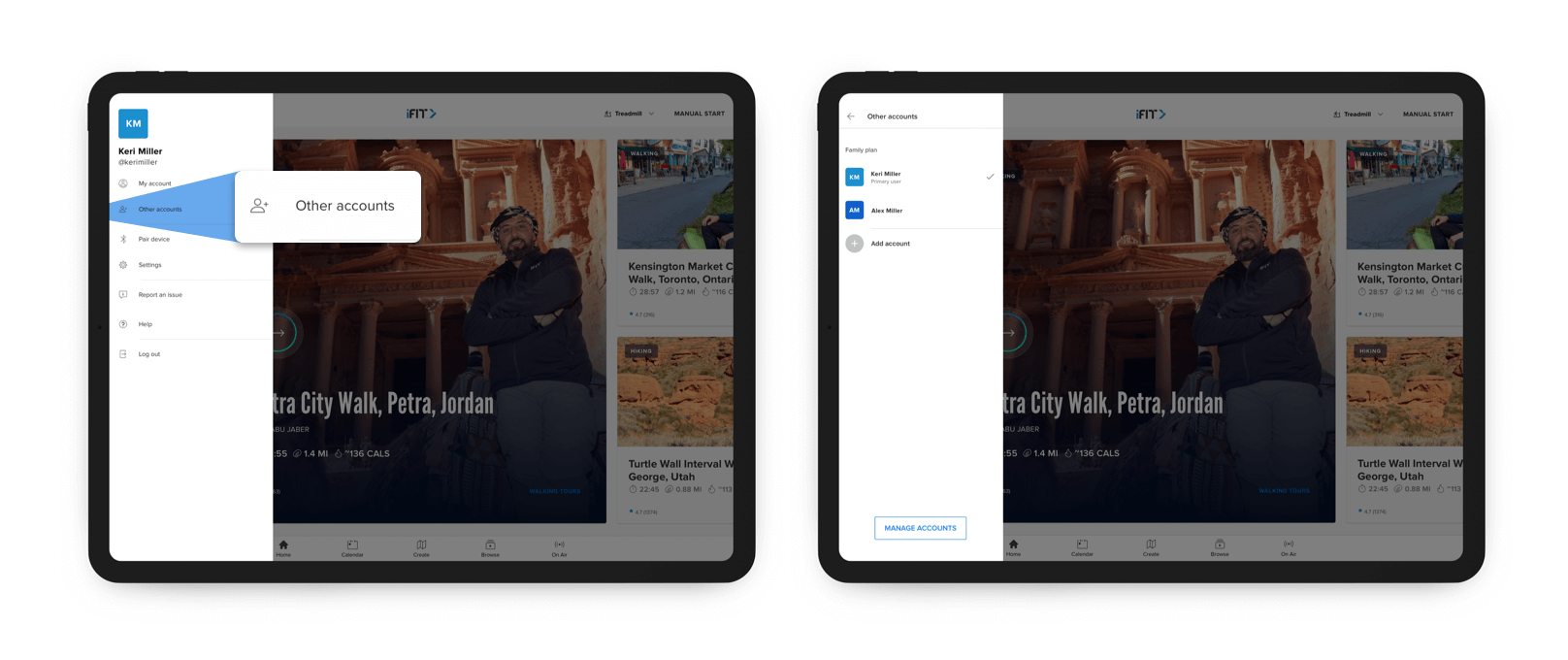
How to switch between users

Once you’ve added users to your account, you can easily switch between them, right on your machine (if you are sharing the equipment with members of the same household). Each user just needs to log into their account on the shared machine once, then they have access to their account when they are ready to start a workout. 

Here’s how to switch between users on your machine:

  • On the dashboard of your machine, tap the name of the primary account holder.
  • Tap “Other accounts.”
  • Select the account that you’d like to use.
  • If you’d like to add an account, tap “Add account” and log in with your iFIT email and password to add the account to your machine.
  • Once you select the account you’d like to use, you’ll have full access to the iFIT Library, and you can track individual stats, continue series, and save workouts to your Favorites.

You can also remove members from your account if they are no longer using their iFIT membership.
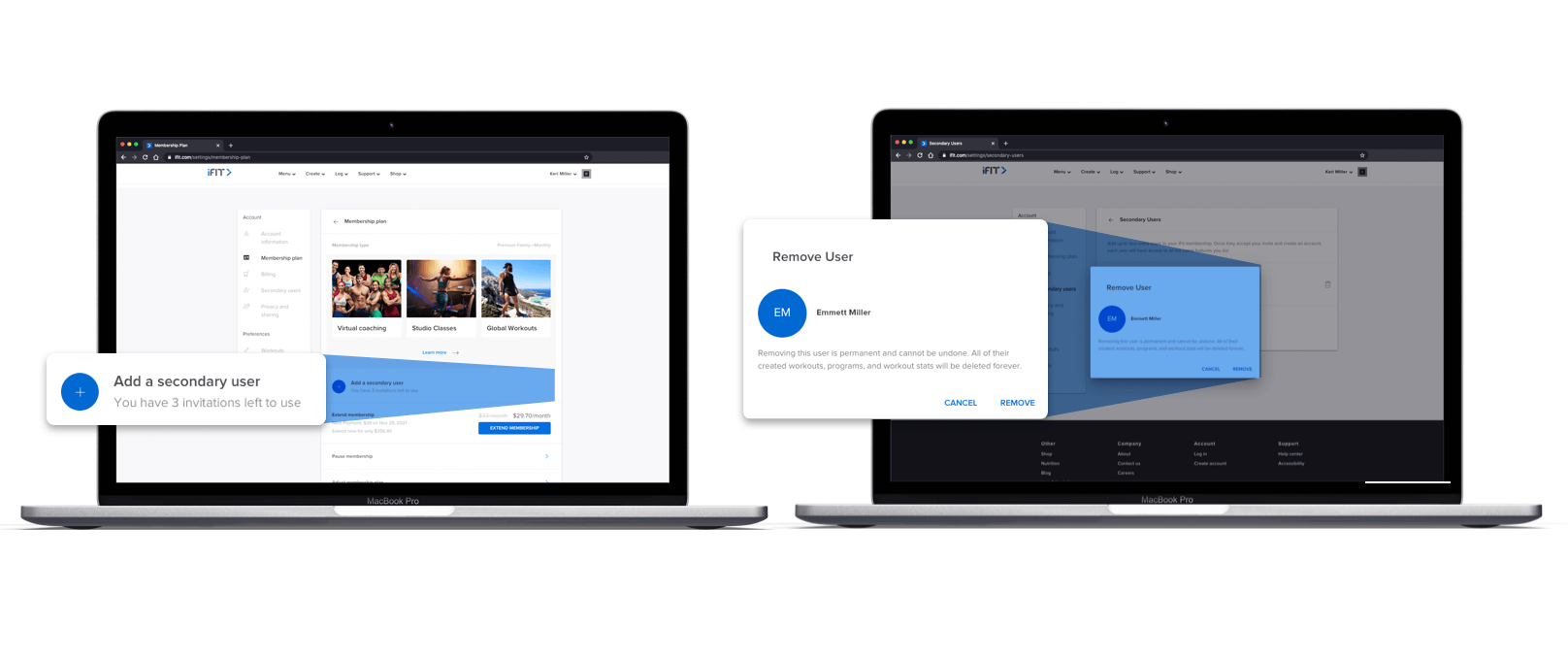
How to remove users

  • Go to iFIT.com/login.
  • Enter the email address and password for your account.
  • Hover your mouse over your name in the top, right-hand corner of the screen.
  • In the drop-down menu, click on “Settings.”
  • In the left column, click on “Membership plan.”
  • Click on the blue plus sign.
  • On the next screen, your secondary users are listed.
  • Click the trashcan icon or “Unlink?”.
  • A dialog box will appear, and you can confirm their removal by clicking the “Remove” link.

Want more information about your iFIT membership? Read the Guide to Getting Started with iFIT Part 1 and Part 2. 

Disclaimer: This blog post is not intended to replace the advice of a medical professional. The above information should not be used to diagnose, treat, or prevent any disease or medical condition. Please consult your doctor before making any changes to your diet, sleep methods, daily activity, or fitness routine. iFIT assumes no responsibility for any personal injury or damage sustained by any recommendations, opinions, or advice given in this article. Always follow the safety precautions included in the owner’s manual of your fitness equipment.

You might also like

WordPress blog image - PerksPartners-1920x625-1.jpg

VennGo

Access exclusive pricing to iFIT’s top brands, only available through your VennGo program.

September 18, 2020

Read More
WordPress blog image - PerksPartners-1920x625-1.jpg

PerkSpot

Access exclusive pricing to iFIT’s top brands, only available through your PerkSpot program.

September 18, 2020

Read More
Dash to the Finish Challenge: End the Year Strong with iFIT

Dash to the Finish Challenge: End the Year Strong with iFIT

We’ve reached the final stretch in iFIT’s Finish Strong journey, a three-month commitment to staying active, motivated, and focused through the end of the year. You’ve built your consistency, and now it’s time for the grand finale: the Dash to the Finish Challenge.This month is all about pushing to the finish line while celebrating how far you’ve come. Embrace the season, whether you’re walking through the holiday markets in Germany or feeling the Jingle Bell Burn in the iFIT Studio.It’s time to finish strong!Complete the workouts from your selected Challenge level by December 31, 2025 and you’ll earn this digital reward for your Trophy Case. Here are this month’s Challenges:Treadmill and elliptical workoutsWalking and Running: Finish strong this month with walks and runs! You’ll explore the famous holiday markets in Germany with Casey Gilbert, complete holiday-themed walks and runs in the iFIT Studio with Ashley Paulson, John Peel, Richard Biglia, Jesse Corbin, Pearl Fu, and Jonnie Gale, walk across a glacier in Argentina with John Peel, and wrap things up in Nepal with Ang Tshering Lama.Join the Dash to the Finish Challenge: Walk & RunCycling WorkoutsCycling: Cycle to the finish line this month! iFIT Trainer John Wessling will lead you through an interval ride and an endurance ride alongside a dog sled team in Alaska. Then, you’ll head to Colorado with iFIT Trainer Keith Gabel to explore the Devil’s Thumb Resort. Finally, iFIT Trainer Ashley McIvor will join you in Norway for a HIIT ride and strength ride that is sure to get you in the holiday spirit.Join the Dash to the Finish Challenge: CyclingRower WorkoutsRowing: iFIT Trainers Alex Gregory and Susan Francia will take you on an epic adventure this month! Join Alex in Wales for endurance and speed rowing workouts, then head to Canada for quick but effective training with Susan, focused on HIIT, power, and endurance.Join the Dash to the Finish Challenge: RowingStrength workoutsStrength: Build strength in the iFIT Studio and in Iceland this month! Catch the incredible dynamic duos of Hannah Eden and Paulo Barreto, John Peel and Ashley Paulson, and Hannah and Ashley, and a solo workout with Shannon Cooper for fun, holiday-themed workouts. iFIT Trainer Jonnie Gale will round things out with two strength-focused workouts in the stunning backdrop of Iceland.Join the Dash to the Finish Challenge: StrengthDisclaimer: The primary purpose of this blog post is to inform and entertain. Nothing on the post constitutes or is intended to be a substitute for professional medical advice, prevention, diagnosis, or treatment. Reliance on any information provided on the blog is solely at your own risk. Always seek the advice of your physician or other qualified health provider with any questions you may have regarding a medical condition, and please consult your doctor or other health care provider before making any changes to your diet, sleep methods, daily activity, or fitness routine. Do not disregard professional medical advice or delay seeking it because of information available on this blog. iFIT assumes no responsibility for any personal injury or damage sustained by any recommendations, opinions, or advice given in this article. Always follow the safety precautions included in the owner’s manual of your fitness equipment.

December 1, 2025

Read More
See More

Get the iFIT app

iFIT for Equipment

Follow Us

Social Icon - Youtube
Social Icon - Pinterest
Social Icon - Facebook
Social Icon - X (Twitter)
Instagram

Our Company

About UsOur LeadershipScience CouncilCareersNewsroomBlogShop

Support

Help CenterStatusContact

Legal

AccessibilityConsumer Health Data NoticeMobile TermsPrivacy PolicyTerms of Use

Copyright© 2025 iFIT Inc.