The beginning
Hey guys! My name’s Cade Seeholzer. I am a project manager here at iFit. I was asked to share my experience training for a half-marathon these past six months, so here goes…
My marathon journey began in April, but technically, I think it began in February when I decided to make some serious lifestyle changes and strive to live healthier. I started eating less salt (I love seasoning on almost everything), eating fruit almost every day (primarily strawberries, raspberries, and blueberries with the occasional banana or handful of blackberries), and also being open to healthier options. I even started keeping track of my net calories.
Let me be clear, before February this wasn’t me at all. I’m a 150-pounder with a high metabolism that acts as my own personal food shredder, so gaining weight has never been a problem. But my high metabolism has come with a price. It may have stopped me from gaining weight, but it’s also given me a false sense of security that I could eat whatever I wanted, whenever I wanted. I've always eaten unhealthy and never thought much about it because, well, it never affected my weight. Regardless, I decided that I needed to make a change for my long-term health.
So why did my marathon journey begin in February? Well, people in the office became involved with my healthy transformation, and by April, I was asked by our iFit trainer if I wanted to train for a half marathon that would take place in August. I thought about it and knew if I committed to it, I would do it. So I committed and didn’t look back. I never thought I’d ever do a half marathon, or a marathon of any kind, but it matched my new lifestyle, so I jumped on board.
Training time
I'm pretty sure I hadn’t ran a full mile since 8th grade gym class, which was about 19 years ago. On my first training run, the first 0.2 miles of it were a cake walk. Then all of a sudden, I felt all the years of unhealthy eating and being out of shape kick in. By 0.6 miles, I had to stop and walk. I felt like death was upon me. I walked for a bit before running again. I made it to the 1.0 mile marker and had to sit down for a few minutes to let me body regroup.
It would have been easy to give up after that first run, but I pushed on and continued my training. Occasionally, I ran with other people, but I mostly ran by myself. Not having someone there pushing me was a true test of my commitment. After my first month of running three times a week and steadily increasing my distance, I replaced my old, cheapo-deapo running shoes with a pair of Altra running shoes to hopefully improve my running experience. They were much more comfortable and definitely made running long distance more enjoyable. The next month of running things went okay and by the end of June, I was able to run four miles without feeling like I was going to die. Soon after that momentous milestone, I came down with a lower leg injury, which made running super uncomfortable. I went from regularly running to only running four times in July and twice in August. I decided to let the injury heal fully, then I'd just pop some ibuprofen and run the day of the race.
Race day
Well, the night before race day, I spent the evening playing fantasy football and eating a healthy serving of Buffalo Wild Wings. Because, yeah, I still like to live a little and I wasn’t about to pass that up. (I know what you’re probably thinking...I hit rock bottom again in my old, unhealthy ways. But I’m still a healthy eater, just not on fantasy draft night. Luckily, the wings settled fine with no dire consequences the next day!)
So the day came, and good grief! Marathons are EARLY. Just like I hadn’t ran since 8th grade, I also hadn’t woken up at 4:30 a.m. since, probably, birth. I had two eggs, two slices of toast, and I was on my way.
I drove to the meeting place at 5:00 a.m., then jumped on an old yellow school bus that shuttled us all to the starting line. The squeaky doors of the bus swung open and I was ready...I was pumped...I was...informed that the race wouldn’t start until 7:00 a.m. (What?!) So we waited up there in the 50-degree-or-so weather for an hour and a half. During the entire time, I hummed to myself Neil Young’s “Needle and the Damage Done.” I’m not sure why that song was in my head, but it was a nice, calming tune to get through the wait.
At a quarter to seven, the marathon organizers told us to put our clothes bags on the special clothes bus, then take our place at the starting line. I found other “iFitters” from the office that were also running, so three of us took our mark behind the 3-hour pacer. We knew that finishing before everyone was gone was all that mattered. I decided that just before the gun shot off, that this may be the first and last marathon I ever do, so I might as well document it. I pulled out my phone to photograph and video the entire race.
During the race
The gun sounded and off we went, first at a slow walk, then a slight jog, then to a good warm-up pace. At first, I jogged with a coworker and remarked that I felt somewhat like Bob from the movie “What About Bob?” “I feel good, I feel great, I feel wonderful.” and “Baby, step out of the office, baby step onto the elevator, and baby step onto the bus.” He and I had some good chuckles over that, then he had to stop to fix his shoelace. At that moment, I became a lone wolf and picked my pace up to the pace I ran during training. I found a good breathing pattern, put my body into good running form, then opened my Pokemon Go app to hatch some eggs. (Side note, I hatched all nine eggs in my queue throughout the race all while taking selfies, video logging, and texting my wife. Worth it to have my phone!)
As I was running, I discovered that some random civilians felt the need to drive through the crowd of runners, which normally is fine, unless you were the dude in the diesel truck driving next to me at the same pace. Just as I got my breathing in a good place, I had to breathe in your stupid truck fumes...come on, man!
Anywho, before the marathon, I’d never ran farther than 4 miles without needing to stop. But I went 7½ miles without stopping during the race! I ran through the 3 and 6 mile rest stops choke-drinking down my water cups. My goal was to run 10-minute miles during the race. I ran 10:17 miles through those first 7½ miles. I did WAY better than I expected myself to do...then I slowed to my first walk. Up to that point, my left leg was totally numb and my right was mostly numb. From the waist down, I was good, just tired, so I slowed to a walk. During my first walk, the numbness went away, and it was all downhill from there. My hips slowly started to hurt, soreness in my knees began, my arches in both feet tightened up in pain, and my right bicep felt sore, like my phone was a 2-pound weight in my hand. The next 5½ miles were rough. I averaged 14:23 per mile. I would run a ½ mile, then would need to walk...and I repeated in that fashion until the end.
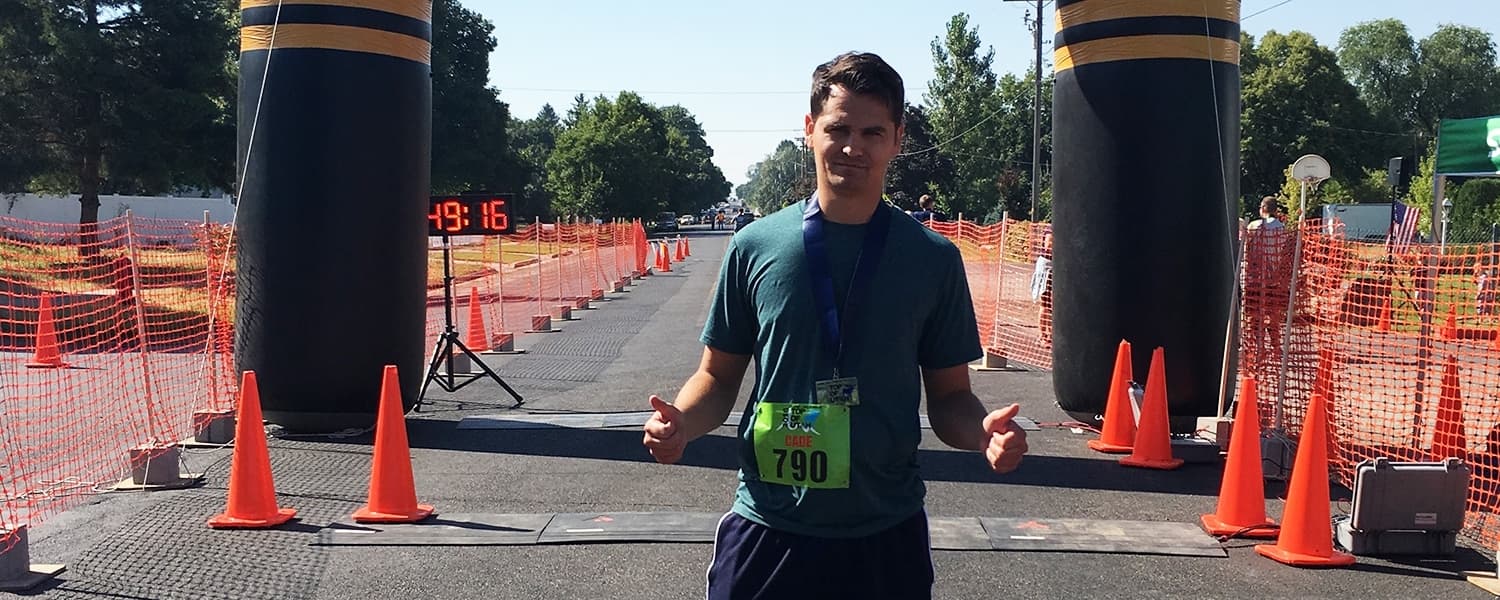
Before I started walking, I was closing in on the 2-hour pacer. Then I watched the 2:15 and 2:30 pacers pass me by. Something like 140 people passed me up in those last 5 or so miles. My arches were the worst of all. At one point, I attempted tippy-toe running, but that didn’t really last, mostly because it didn’t help. I walked through the last two aid stations, and eventually, through the pain, I saw the big blowup finish line in the distance! I attempted to run the final mile, but soon lost the desire to run in pain until I had about 0.2 miles left. I knew I had to run at the very end to save face. At the finish line, my wife, daughter, and son were there waiting for me. I high-fived my daughter, then finished the race. As one of the volunteer girls struggled putting my participation medal over my neck, I breathed a sigh of relief. I was done. The race was over.
The end
Would I do it again? I...think...yes? I mean, I’m pretty sure that I’m glad I did it. Being an inexperienced, sort-of-dedicated, first-time marathoner, I’m proud of myself for just making it to race day and crossing the finish line. As I write this, I’m still really sore. My arches kill and my body aches. My four-year-old daughter tells me I’m walking like an old grandma, so there’s your visual if you were wondering how I’m holding up. So we’ll see if I attempt another 13.1 miles again in the future. But if you’re thinking of doing your first half-marathon, or half anything, the key is to commit and see it through to the end!
Thanks for reading!
Cade Seeholzer
iFit Digital Marketing Project Manager
WARNING: This post is not intended to replace the advice of a medical professional. The above information should not be used to diagnose, treat, or prevent any disease or medical condition. Please consult your doctor before making any changes to your diet, sleep methods, daily activity, or fitness routine. iFit assumes no responsibility for any personal injury or damage sustained by any recommendations, opinions, or advice given in this article.
You might also like

Introducing SmartAdjust™ for Your Treadmill: iFIT’s New Personalized Workout Experience
SmartAdjust personalizes your treadmill workout before it even starts, adapting speed and incline to your fitness level in real time.
March 16, 2021

Strength Training While on GLP-1: A 6-Week Plan
When your body weight changes, you aren’t just losing fat—research shows you risk losing lean muscle mass, too. Protecting that muscle is the key to maintaining your metabolism and everyday strength. This practical 6-week guide breaks down exactly how to structure a simple, 20-to-30 minute full-body strength routine 2–3 times a week. Built around foundational compound movements like squats and rows, this plan shows you how to safely implement progressive overload without burning out your energy. Give your body a clear signal to keep its muscle and build a routine that sticks.
May 26, 2026

Find Your Stride with Tommy Rivs in the Joy of Running Part 2: Redwoods, Workouts 1-10
There’s just something magical about taking your next step forward, especially when it means you’re surrounded by the towering redwoods and rugged beauty of California’s northern coast. iFIT Trainer Tommy Rivs’ newest series will help you experience the magic of this region with the Joy of Running Part 2: Redwoods, Workouts 1-10. This beginner-friendly program is designed to help you progress from walking to running at your own pace.Explore California’s Scenic CoastSet along breathtaking coastal trails and through scenic redwood groves, this series brings the natural beauty of Northern California to your treadmill. From the peaceful paths of Laguna Point to the rolling meadows of Mendocino Headlands, each workout is an opportunity to breathe, move, and connect with the pure joy of movement.Make Progress with Tommy RivsKnown for his thoughtful coaching and love of movement, Tommy Rivs will guide you through a mix of walking and running intervals to gradually build your endurance and confidence. Each workout keeps the speed steady while changing your movement so you can focus on how your body feels and adapts as you move.Whether you’re returning to fitness or taking your first steps toward running, this series is all about moving forward with purpose. Tommy will help you to:Develop endurance and build strength with progressive intervalsImprove your form and consistency with his expert guidanceReconnect with the joy of movement in an inspiring settingBuild confidence to take on your next running challengeThis is only the beginning; there’s so much more to come with Rivs. For now, lace up those shoes and join him for an incredible journey amongst the redwoods.Join Tommy Rivs in the Redwoods
November 3, 2025